Mockup
Fitness app mockup
A fitness app mockup is your own screen (a workout, a class list, a progress view) inside a device frame. 240fps does it in the browser: paste a screenshot, drop an image or video, or put a live site in the frame. Designing is free; full-size exports are $7 a month or $39 once. There's no fitness template; you bring the screen.
What to put in the frame
A fitness app mockup works best when the screen shows the app doing its job. Pick the one screen that says what your app is for: a workout in progress, a week of sessions, or a class booking. Use real-looking numbers and names, not placeholder text, so the frame reads as a product someone already uses.
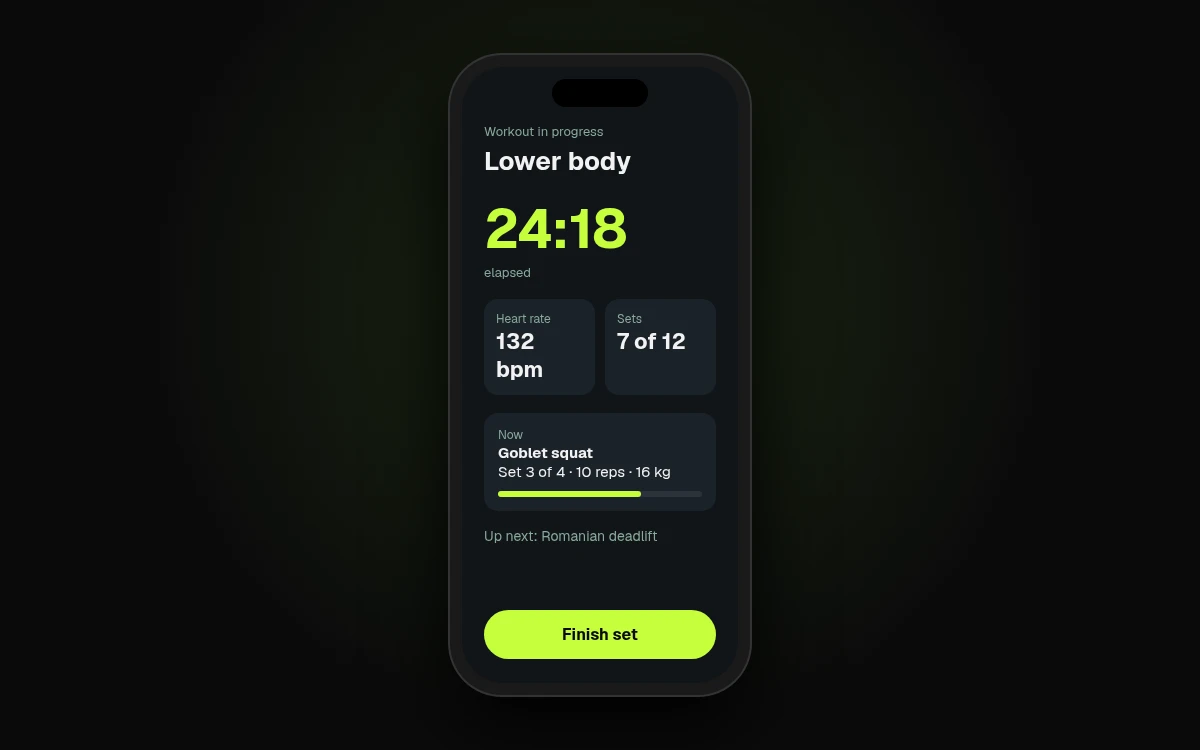
The example below is a lower-body workout in progress: 24:18 elapsed, a heart rate of 132 bpm, 7 of 12 sets done, and a goblet squat on set 3 of 4, with a Finish set button. It's an original screen made for this page, not a real brand's app. Yours will be your own app's screen.
If your app isn't built yet, a design export works the same way: a mockup is a picture of the finished screen. There's more on that in what a mockup is.
Make it in the browser
240fps puts your screen in a device frame in the browser, with nothing to install:
- Open the editor with the phone selected. Start from the iPhone 17 mockup, or use the button on this page.
- Add your screen. Paste a screenshot (⌘V), drop an image or video on the canvas, or choose Website and paste a URL. Adding a website needs a free account.
- Style the scene. Pick a finish, a layout and a background, or start from a template.
- Export. Export an image as PNG, JPEG or WebP, or switch to Videos, add motion and export an MP4, WebM or GIF.
Already have the screenshot? The screenshot to mockup tool starts from it.
The phone is only one frame. A coach or studio dashboard reads better on a tablet, so try the iPad Pro 13 mockup. If your app has a watch companion for workouts, put that screen in the Apple Watch Ultra mockup, whose screen is 205 × 251 points. Every frame is in the device mockups, and several can share one scene.
Store screenshots are a different file
A mockup is for a landing page, a launch post or a pitch deck. The App Store wants screenshots at its own sizes, and Apple has its own rules for them. According to Apple's screenshot specifications:
- You must include at least one screenshot, and can upload up to 10 per device size.
- Files are .jpeg, .jpg or .png, and can't include alpha channels or transparency.
- iPhone apps need at least one screenshot for iPhone with Dynamic Island (medium display).
- If your app supports iPadOS, it also needs at least one for the iPad 13-inch display.
Before you export, check which sizes App Store Connect asks for on your app's version.
For the store set itself, use the App Store screenshot maker in the Screenshots studio. It exports 240fps's own preset sizes: iPhone 6.9″ (1320 × 2868), 6.5″ (1284 × 2778), iPad 13″ (2048 × 2732) and Google Play phone (1080 × 1920). See App Store screenshot sizes for every device.
Price
Designing is free, with every device, template and background, and the Screenshots studio. Free exports are previews up to 1280 px with a small 240fps mark.
Full-size exports are $7 a month (Monthly) or $39 once (Lifetime). Either plan also covers the App Store and Google Play screenshot sets, and unlocks 240fps for Mac with its screen recorder. See 240fps pricing.
FAQs
Does 240fps include a fitness mockup template?
No. 240fps has no fitness template, and you bring the screen: a screenshot of your own app, a design export, a screen recording or a live website. You put it in a device frame such as the iPhone 17, then style the background and layout yourself or start from one of the general templates.
Can I mock up the Apple Watch version?
Yes. 240fps has an Apple Watch Ultra frame with a 205 × 251 point screen. Paste or drop your watch app's screenshot onto it, and it can sit in the same scene as the iPhone version. Export it as an image or, in Videos, as an animated MP4, WebM or GIF.
What App Store size should I export?
Apple requires at least one screenshot for iPhone with Dynamic Island (medium display), plus the iPad 13-inch display if your app supports iPadOS. Up to 10 screenshots per size, as JPEG or PNG without transparency. Confirm the sizes in App Store Connect, then export them from the 240fps Screenshots studio.
Is designing free?
Yes. Designing in the browser is free, with every device, template, background and the Screenshots studio. Free exports are previews up to 1280 px with a small 240fps mark. Full-size exports come with 240fps Monthly at $7 a month or Lifetime at $39 once, and either plan unlocks 240fps for Mac.