Comparison
240fps vs SmoothCapture
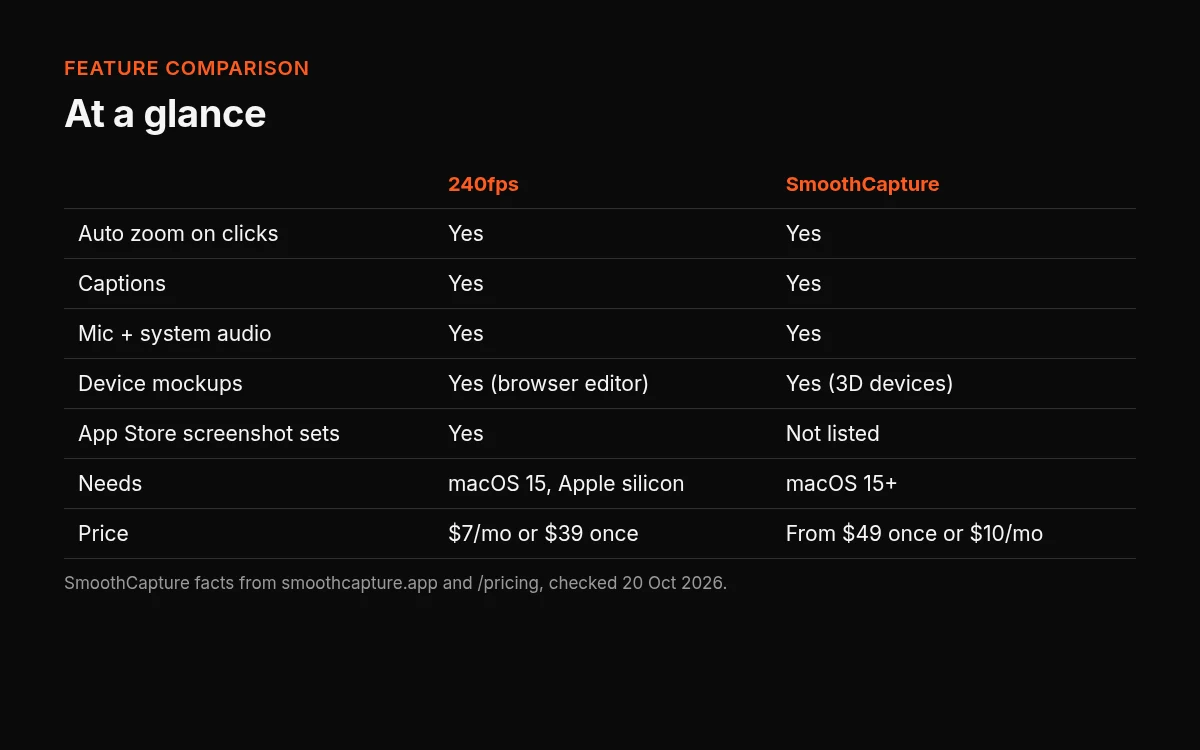
Both are Mac screen recorders aimed at polished product videos. 240fps also makes App Store and Google Play screenshot sets in the browser. Designing is free. Full-size exports are $7 a month or $39 once, and that plan unlocks 240fps for Mac. SmoothCapture, on its pricing page as of 20 Oct 2026, is free to record and edit, and exporting needs a licence from $49 once or $10 a month. The table below is only what each site listed that day.
Quick verdict
Choose 240fps if you want App Store and Google Play screenshot sets made in the browser and the lower published price, and you're recording your Mac. Choose SmoothCapture if you want an iPhone or iPad recorded over USB, the iOS Simulator inside the Mac app, or the 3D camera moves its homepage describes.
Neither is the winner on every count; they're built around different extras. The rest of this page is what each company's own site said on 20 October 2026.
Feature comparison
"Not listed" means the pages we checked don't mention it. It doesn't mean the app can't do it.
| 240fps, as of 20 Oct 2026 | SmoothCapture, as of 20 Oct 2026 | |
|---|---|---|
| Platform | Browser editor, plus 240fps for Mac, which needs macOS 15 Sequoia or later on Apple silicon (M1 or later) | Native Mac app. Homepage: "macOS 15+". Press kit: macOS 15 Sequoia or later. Cursor-recording page and the homepage FAQ: macOS 15.2 or later |
| What it records | A display, one window or an area, with the microphone, the computer's sound (mixed or apart) and the camera. It records the Mac, not the phone | The Mac screen, a window or an area; an iPhone or iPad over USB; the iOS Simulator. Camera, microphone and system audio |
| Automatic zoom | Zooms in where you clicked; each zoom can be dragged, trimmed or deleted. No zoom range listed | Zooms from clicks and from typing, 1.2x to 10x (features page) |
| Cursor | Recorded separately, so it can be smoothed, made bigger, given a click ring, or hidden when it isn't moving | Smooth cursor motion, a click ripple, a magnifying orb, adjustable size, auto-hide when idle and click sounds (features page) |
| Captions | Written for you, transcribed on the Mac. Caption styles and SRT export not listed | On-device transcription; the homepage names Apple Speech or FluidAudio, with a transcript editor |
| Webcam | The camera is a recording option. Layouts not listed | Picture-in-picture, fullscreen or side by side, with size, shape, border and shadow |
| System audio | The computer's own sound, mixed with the microphone or apart | System audio capture; the homepage says you can mix mic and system audio |
| Export | Mac recorder: MP4 up to 4K at 60 fps, H.264, at any length. Browser: PNG, JPEG, WebP, MP4, WebM and GIF, videos up to 60 seconds, up to 4K | MP4 (H.264 and HEVC) and GIF, up to 4K at 60 fps (features page). The homepage also lists MOV and transparent ProRes 4444 |
| Device mockups | iPhone, iPad, Mac, Apple Watch, Android and browser frames, in the browser; a Mac recording can go into a device mockup. A 3D camera isn't listed | Homepage: 3D devices with camera moves, an iPhone Duo that unfolds, Apple Watch on the same timeline, up to eight layers, transparent background. Features page: iPhone, iPad and MacBook frames, plus a 2D frame |
| App Store screenshots | Screenshot sets for the App Store and Google Play, the App Preview video and the app icon, with upload to App Store Connect | Not listed on the pricing page, features page or homepage |
| Try before paying | Designing is free; free exports are previews up to 1280 px with a small 240fps mark | Record and edit for free; exporting needs a licence |
| Price | $7 a month or $39 once | From $49 once, or $10 a month |
Pricing
240fps, from 240fps pricing and the 240fps for Mac page on 20 October 2026: designing in the browser is free. Monthly is $7 a month and Lifetime is $39 once. Either one unlocks full-size exports with no mark, and 240fps for Mac. The download page says both plans include every update. It doesn't say how many Macs one plan covers.
SmoothCapture, from its pricing page on 20 October 2026:
- Basic: $49 once, for 1 Mac, with 1 year of updates; you keep that version afterwards.
- Personal: $79 once, for 2 Macs ("Every feature on a second Mac").
- Lifetime: $149 once, for 3 Macs, with updates forever.
- Monthly: $10 a month, for 3 Macs, cancel anytime.
The page says every plan includes every feature and commercial use. It also lists a 30-day money-back guarantee, checkout through Creem, a licence key by email, and that taxes may be added. One-time plans and a monthly plan are both on that page.
SmoothCapture also has a separate iPhone app on the App Store. That listing is a different product from the Mac recorder, so its pricing isn't compared here.
Where SmoothCapture is the better pick
- You need a phone or tablet recorded directly. SmoothCapture's homepage lists iPhone and iPad capture over USB, and the iOS Simulator, inside the Mac app. 240fps records the Mac; a phone app is recorded on the phone or in the Simulator, then brought in.
- You want 3D device shots. The homepage describes 3D camera moves and Apple Watch on the same timeline as other devices. A 3D camera isn't listed on 240fps's download or screen recorder pages.
- You want zooms from typing, or a set zoom range. The features page lists zooms generated from typing and a range of 1.2x to 10x. 240fps documents zooms on clicks and doesn't give a range.
Where 240fps is the better pick
- The published price for one person is lower. 240fps is $39 once, and the download page says that includes every update, or $7 a month. SmoothCapture's one-time plan for one Mac is $49 with 1 year of updates, and its monthly plan is $10 for 3 Macs.
- You also make App Store and Google Play screenshot sets. 240fps makes them in the browser, with the App Preview video and the app icon, and uploads to App Store Connect. Those aren't listed on the SmoothCapture pages we checked. See the App Store screenshot generator.
- You want to design without installing anything. The 240fps editor runs in the browser, including its device mockups. SmoothCapture's recorder is a Mac download.
How to try both
There's no migration to plan: neither site describes opening the other's project files.
- SmoothCapture: download it, record and edit for free, and buy a licence when you want to export. Its pricing page lists a 30-day money-back guarantee.
- 240fps: design in the browser for free; free exports are previews with a small mark. The $7 or $39 plan unlocks full-size exports and 240fps for Mac, the screen recorder with automatic zooms.
About this comparison
SmoothCapture details are from its own homepage, features page, pricing page, press kit and cursor-recording page, read on 20 October 2026. 240fps details are from 240fps.com/pricing, /download and /tools/screen-recorder the same day. Features and prices change, so check both sites before you decide. 240fps isn't affiliated with SmoothCapture.
More comparisons: 240fps compared, including 240fps vs Screen Studio. Or read Screen Studio alternatives, free screen recorders for Mac, auto-zoom screen recording and how to screen record on a Mac.
FAQs
Is 240fps a SmoothCapture alternative?
It is when you want a Mac recorder with automatic zooms plus App Store and Google Play screenshot sets in the browser, at $7 a month or $39 once. It's the wrong swap if you need an iPhone or iPad recorded over USB, or the 3D camera moves SmoothCapture lists on its homepage.
Which is cheaper?
On the prices listed on 20 October 2026, 240fps has the lower monthly price ($7 against $10) and the lower one-time price ($39 against $49). SmoothCapture's $49 plan covers 1 Mac with 1 year of updates; its $149 plan covers 3 Macs with updates forever. 240fps doesn't list a Mac count. Compare those terms, not just the first number.
Does 240fps work on Mac?
Yes. 240fps for Mac needs macOS 15 Sequoia or later on Apple silicon. The browser editor is separate and works without it.
Can I make device mockups with SmoothCapture?
Yes, by its own description on 20 October 2026: 3D iPhone, iPad and MacBook devices, and on its homepage Apple Watch and an iPhone Duo, plus a 2D frame on its features page.
Do I need to pay to try 240fps?
No. Designing is free, and free exports are previews up to 1280 px with a small mark. Full-size exports and the Mac app need the $7 a month or $39 once plan.