Tool
Automatic captions on your Mac
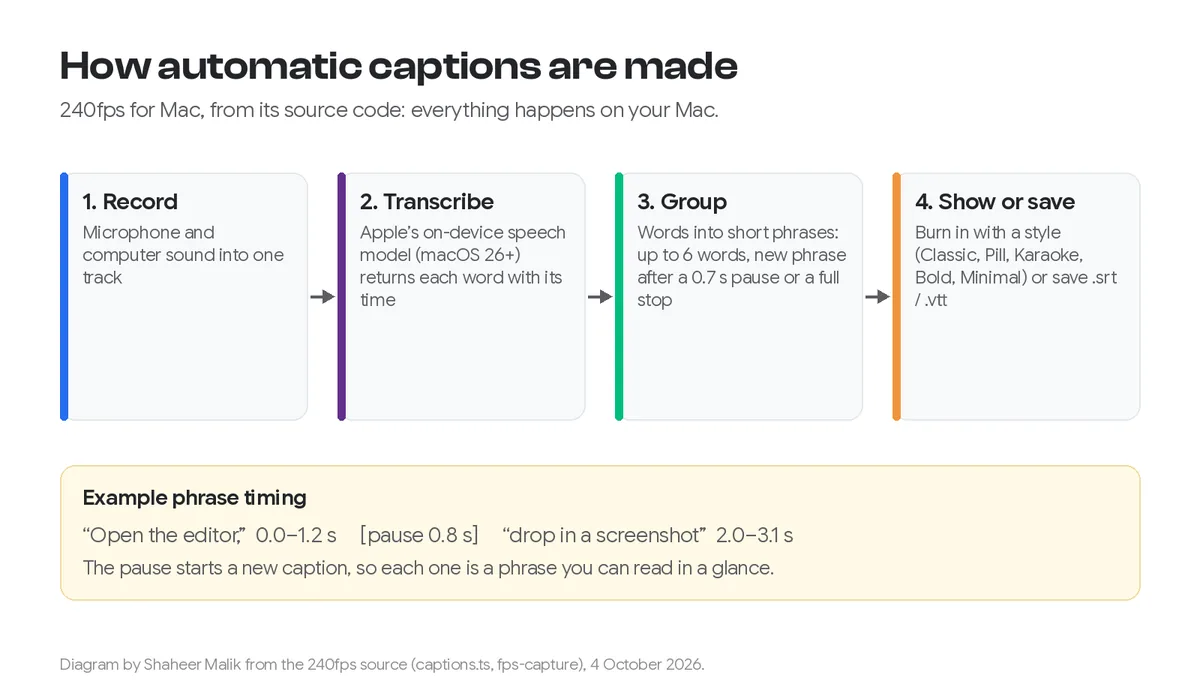
240fps for Mac captions screen recordings automatically: press Transcribe and Apple's on-device speech model turns what you said into words with their times, grouped into short captions. Choose one of five styles (Classic, Pill, Karaoke, Bold or Minimal), the position, size and colours, correct any caption in the list, then burn the captions into the exported video or save them as .srt or .vtt. Transcription needs macOS 26 or later, and nothing is uploaded.
Made on your Mac
240fps uses Apple's speech framework, which runs on the Mac itself, so the recording isn't sent anywhere and there's no per-minute charge. It transcribes your microphone track, or the computer's sound if you recorded without a microphone.
Short captions, in time
Every word comes back with the moment it was spoken. 240fps groups the words into short phrases, starting a new one after a pause, at the end of a sentence or after the number of words you set (1 to 12), and holds each one a moment after its last word. Karaoke lights up each word as it's said; Bold puts it on a coloured block.
Burned in, or as a file
Burned-in captions show everywhere, including feeds that play with the sound off. Subtitle files suit YouTube, LinkedIn and web players, where viewers can turn them off. The .srt and .vtt follow the finished edit, so trims, cuts and scenes are already in the timings.
How to do it
- 1Record with your microphonePress ⌘⇧R in 240fps for Mac and record with your microphone on.
- 2TranscribeIn the editor's Captions tab, press Transcribe.
- 3Style and checkChoose a style, position and size, then read the captions and correct any word in the list.
- 4ExportExport the video with the captions in it, or save an .srt or .vtt file.
Questions
Which languages does it transcribe?
The language your Mac is set to, when Apple's speech model for it is on the Mac; otherwise the same language from another region, or English. If no model is installed, turning on Dictation in System Settings › Keyboard adds one.
Does it work on macOS 15?
The recorder does, but captions need macOS 26 or later, the first version with Apple's SpeechAnalyzer.
Can I caption a video I didn't record in 240fps?
No. Captions work on recordings made in 240fps for Mac.
How much is it?
240fps for Mac comes with 240fps Monthly ($7 a month) or Lifetime ($39 once).