By Shaheer Malik · · 6 min read
Why 240fps Costs $39 Once, Not a Subscription
240fps costs $39 once because almost all of its work happens on your own device. Exports render in your browser and screen recordings stay on your Mac, so one more customer adds very little to the running costs. A subscription would charge you every month for servers you mostly don't use. If you only need it for a launch, Monthly at $7 is cheaper for up to five months; after that, Lifetime wins.
I make 240fps, so this post is a maker's explanation, not a neutral review. People ask the same question when they see the pricing page: how can a tool that makes device mockups, App Store screenshot sets and product videos, and includes a Mac screen recorder, cost $39 once when its competitors charge every month?
The short answer is architecture. The long answer is below, with the numbers, the catches, and when you shouldn't buy Lifetime.
Prices for 240fps and other tools were read from their own pages on 4 October 2026. Tools differ in what they do, so this is a comparison of bills, not of features.
What does 240fps cost, exactly?
Designing is free in your browser: every device, template, background and animation. You pay to export. There are two plans, and the pricing page says both include exactly the same things:
- Monthly: $7 a month, cancel anytime.
- Lifetime: $39 once, with every update included.
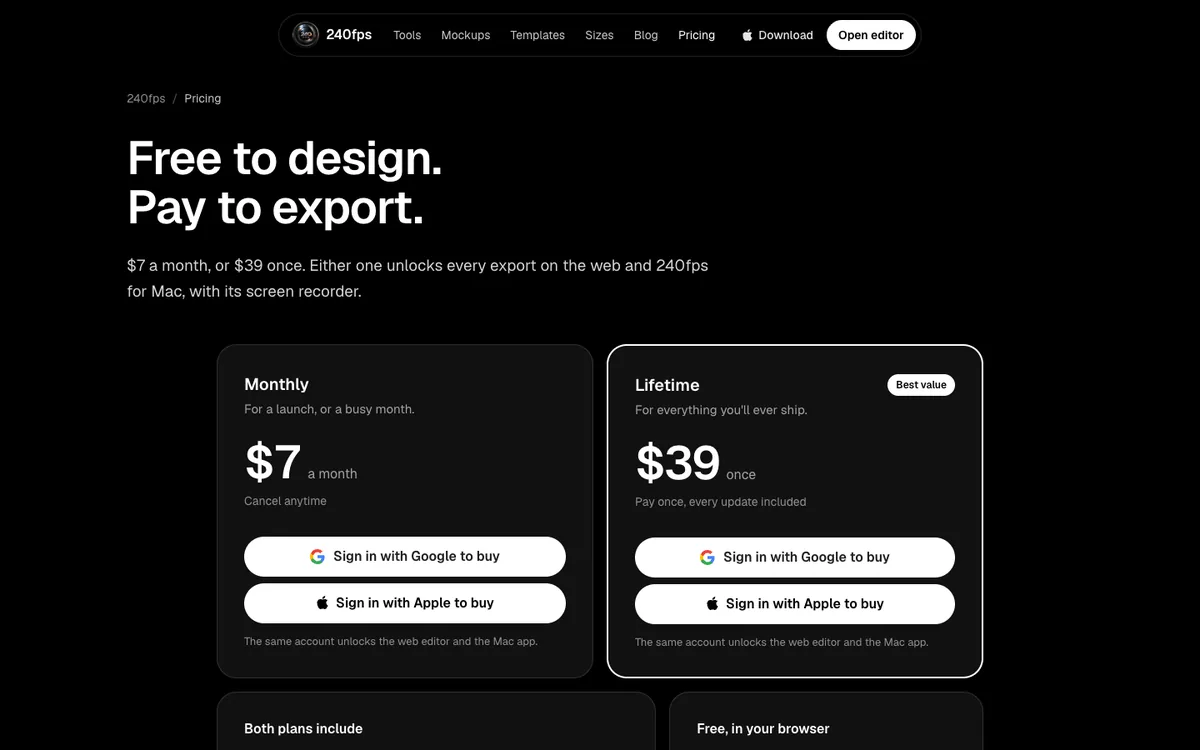
Either plan unlocks every export (PNG, JPEG, WebP, and MP4, WebM and GIF videos up to 60 seconds). It also covers App Store and Google Play screenshot sets, App Store Connect upload, the brand kit, and 240fps for Mac with its screen recorder at any length. Exports have no watermark. Polar handles the payment as merchant of record, so sales tax may be added at checkout.
Why can it be a one-time price?
Because your computer does the heavy work, not my servers. Video tools are usually subscriptions for a real reason: rendering video in the cloud costs money every time someone presses Export. 240fps doesn't do that.
- Exports render in your browser. The editor encodes videos with the browser's own video encoder (WebCodecs), on your machine. The privacy policy says it plainly: exports are made in your browser.
- Your work stays with you. When you're signed out, screenshots, recordings, drafts and exports are stored only in your browser and never uploaded.
- The Mac app is local. 240fps for Mac keeps recordings and their edits in a folder on your Mac, and transcribes captions on your Mac too. It only talks to 240fps.com to sign you in, check your plan and look for updates.
So a new customer adds almost nothing to my monthly bills. A few features do run on servers, such as signed-in project sync, share links and capturing a live website, and they're kept small. The fixed costs exist either way: hosting, the domain, and the $99 a year Apple Developer Program membership that lets me sign and notarise the Mac app. They don't grow with each customer, so a one-time price can cover them.
A subscription would mean charging you every month for servers you mostly don't use. That felt wrong for a tool most people open around a launch and then again a few months later.
How does $39 once compare over time?
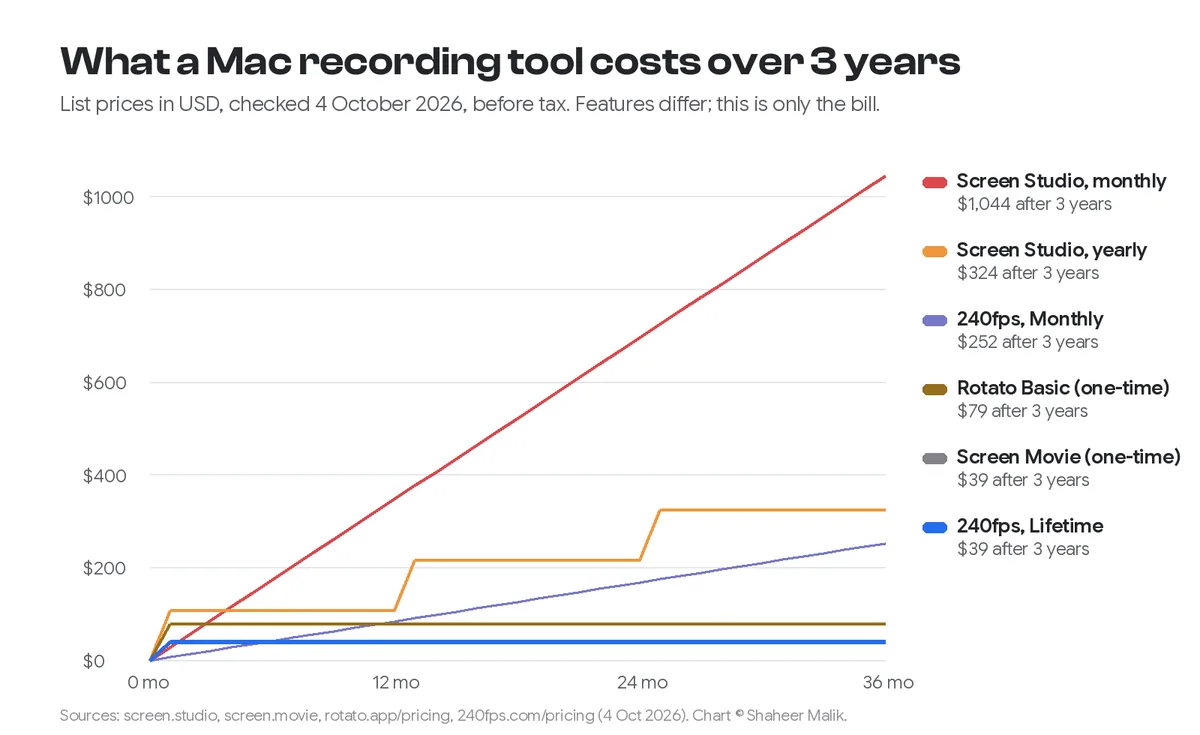
It's the cheapest option after the fifth month, and it stays the same forever. Here's what each pricing model costs, from each product's own page:
| Tool | Pricing model | Price (4 Oct 2026) | After 1 year | After 3 years |
|---|---|---|---|---|
| 240fps Lifetime | One-time | $39 | $39 | $39 |
| 240fps Monthly | Subscription | $7/month | $84 | $252 |
| Screen Studio | Subscription | $29/month, or $9/month billed yearly | $348, or $108 | $1,044, or $324 |
| Screen Movie | One-time | $39 (shown against $79) | $39 | $39 |
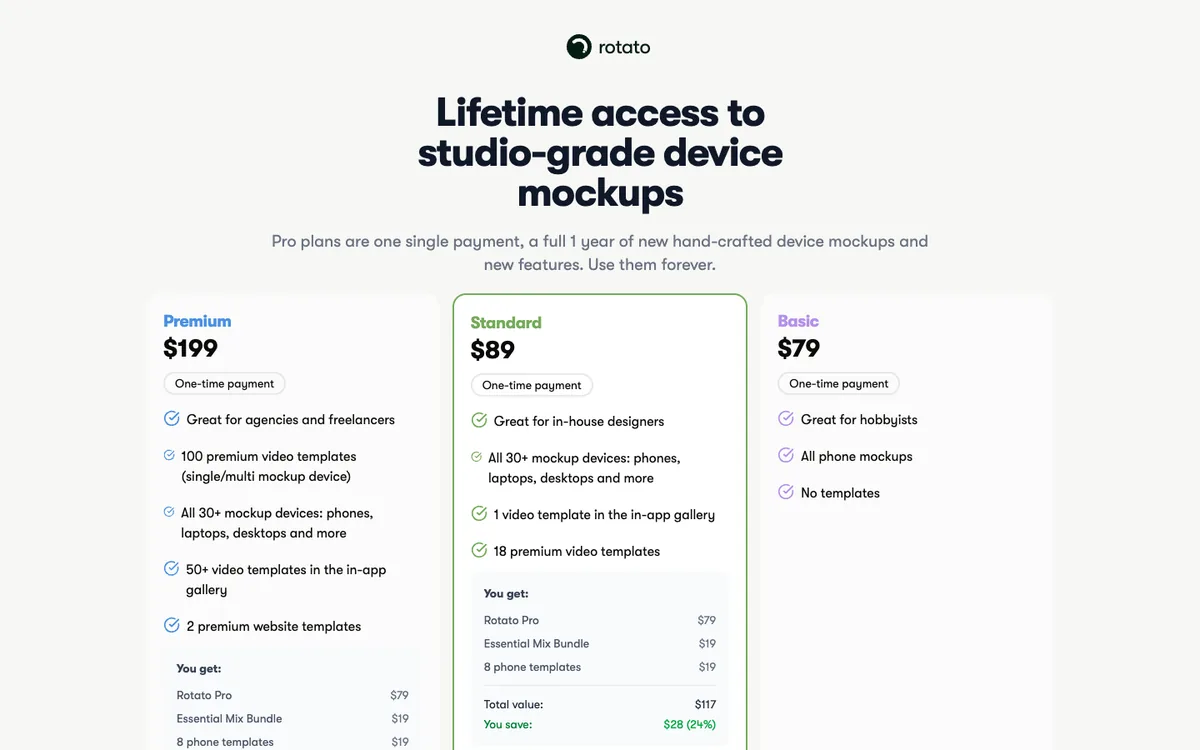
| Rotato | One-time, with a year of new mockups | Basic $79, Standard $89, Premium $199 | $79+ | $79+ |
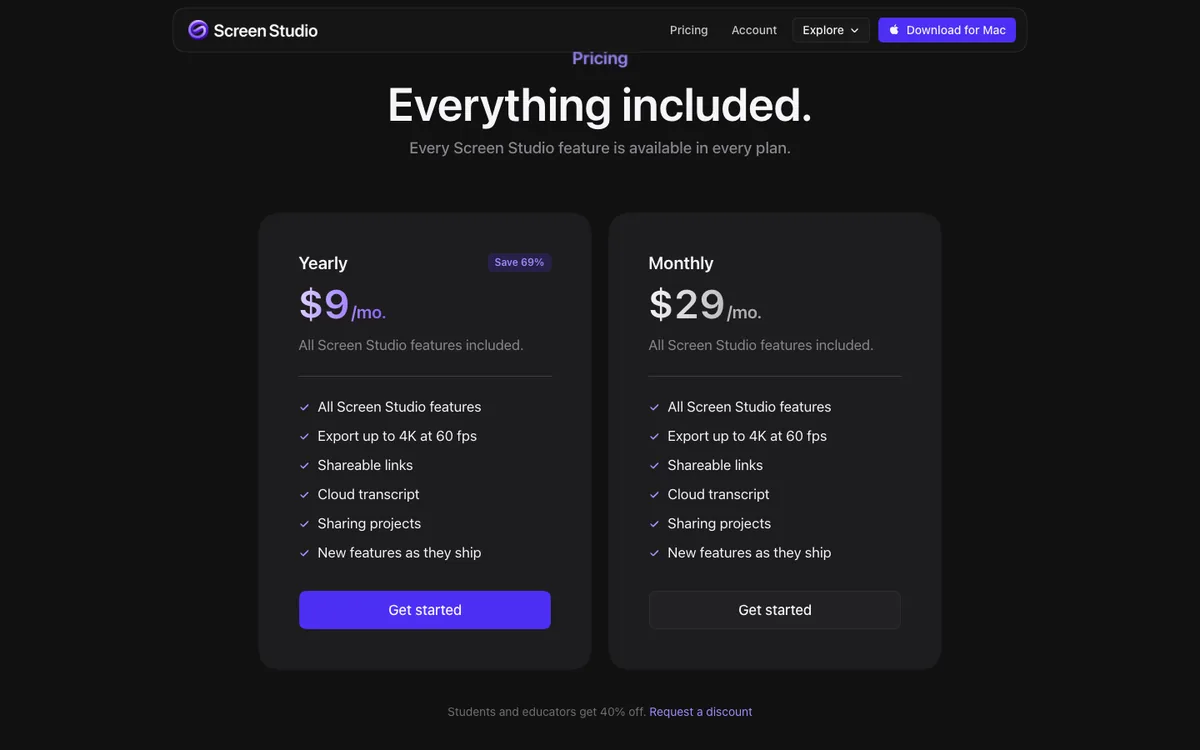
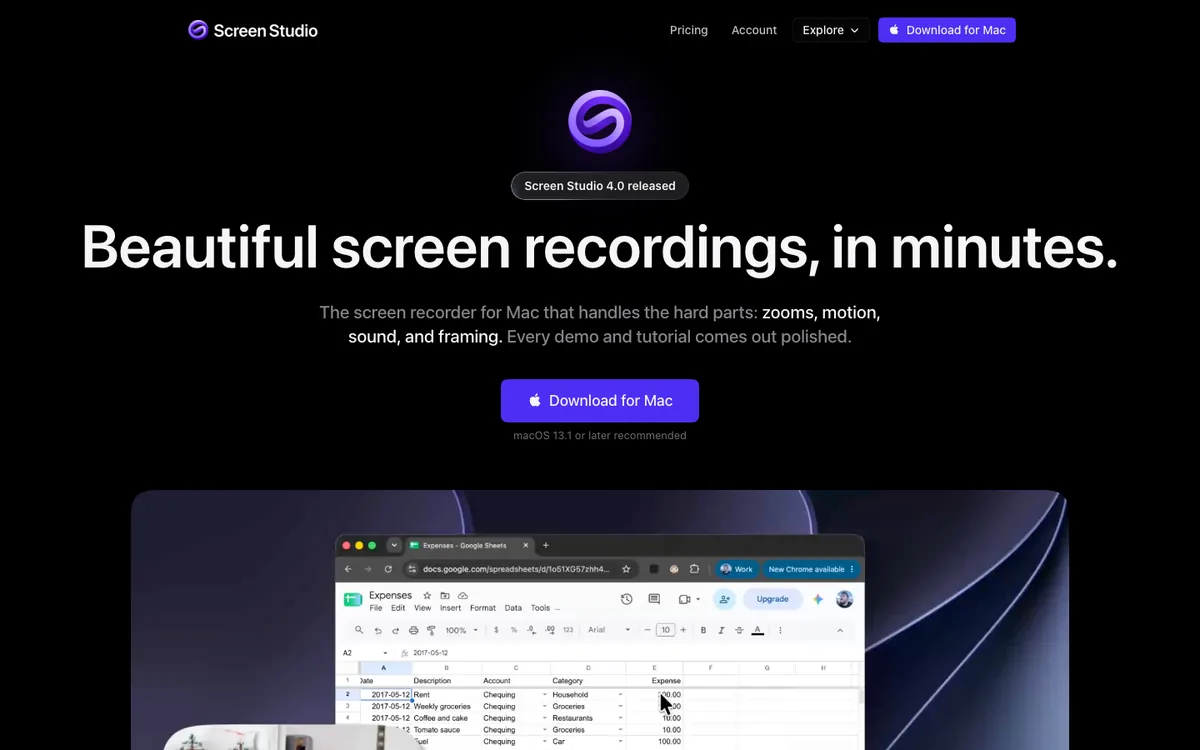
The tools aren't the same. Screen Studio is a dedicated screen recorder with shareable links and cloud transcription. Screen Movie is a $39 Mac recorder like 240fps's recorder. Rotato makes 3D device mockups and animations. I compared the two $39 recorders in detail in 240fps vs Screen Movie, and Screen Studio's plans in Screen Studio pricing.
When is Monthly the better deal?
When you'll use 240fps for five months or less. Five months of Monthly is $35, under the $39 Lifetime price, and six months is $42, over it. So:
- One launch, then done? Take Monthly, export everything, cancel. It stays on until the end of the month you've paid for.
- Shipping updates, screenshots or demos a few times a year? Lifetime pays for itself in its sixth month.
- Not sure? Design everything free first. You only pay at export, so you can see your finished mockup before you buy either plan.
People who bought the older Pro subscription keep every feature, including share links, for as long as they keep it, and Pro also unlocks the Mac app. It just isn't sold to new customers.
What's the catch with a lifetime price?
There are two honest ones, and they apply to every lifetime deal, not just mine.
You're betting the product stays alive. A one-time price only stays good value if the tool keeps working and keeps getting updates. My answer is the architecture above: because 240fps costs little to run per customer, Lifetime sales don't have to fund a growing server bill. That's what makes the model sustainable rather than a launch gimmick.
Prices for new customers can change. Any small software business can change what it charges new buyers. What you've already bought stays as it was sold: Lifetime, pay once, every update included.
There's also a non-catch worth stating: Lifetime doesn't mean "Lifetime, but the good features are extra." Both plans include exactly the same things.
Why not just make it free?
Because free tools that cost money to build either disappear or start selling something else, often your attention or your data. 240fps has no ads and no tracking pixels, and its analytics are cookieless. Charging a fair, small price once is how it pays for itself without any of that. Designing stays free, so you never pay for something you haven't seen.
FAQs
Is 240fps really a one-time payment?
Yes. Lifetime is $39 once, never renews, and includes every update. If you prefer a subscription, Monthly is $7 and can be cancelled anytime.
What's the difference between Monthly and Lifetime?
Only how you pay. Both unlock every export, the App Store and Google Play screenshot sets with App Store Connect upload, the brand kit, and 240fps for Mac with its screen recorder.
Does the $39 include the Mac screen recorder?
Yes. Either plan unlocks 240fps for Mac, which needs macOS 15 Sequoia or later on an Apple silicon Mac. Recordings in the Mac app can be any length.
Are there extra costs after buying?
No add-ons or seat fees. Sales tax may be added at checkout depending on where you live, because Polar, the merchant of record, collects it.
Can I try 240fps before paying?
Yes. Designing is free in your browser, with every device, template, background and animation. You pay only when you export.
Last updated: 4 October 2026. Prices are from 240fps.com/pricing, screen.studio, screen.movie and rotato.app/pricing, and the Apple Developer Program fee from developer.apple.com, all checked on 4 October 2026.