Mockup
Game app mockup
A game app mockup is your own level, score or character screen inside a device frame. 240fps does that in the browser. Designing is free; full-size exports are $7 a month or $39 once. A Play feature graphic is a separate file, 1024 by 500 pixels per Google's help page, and it isn't the phone frame. No game template is listed on 240fps.
What to put in the frame
Pick a screen from the middle of the action, not the title menu: it shows people what playing your game looks like. Three kinds of screen work well:
- A level in progress, with the board, the pieces and the controls all visible.
- A result screen: a score, a cleared level, a new best.
- A character or loadout screen, if your game lets people pick or build something.
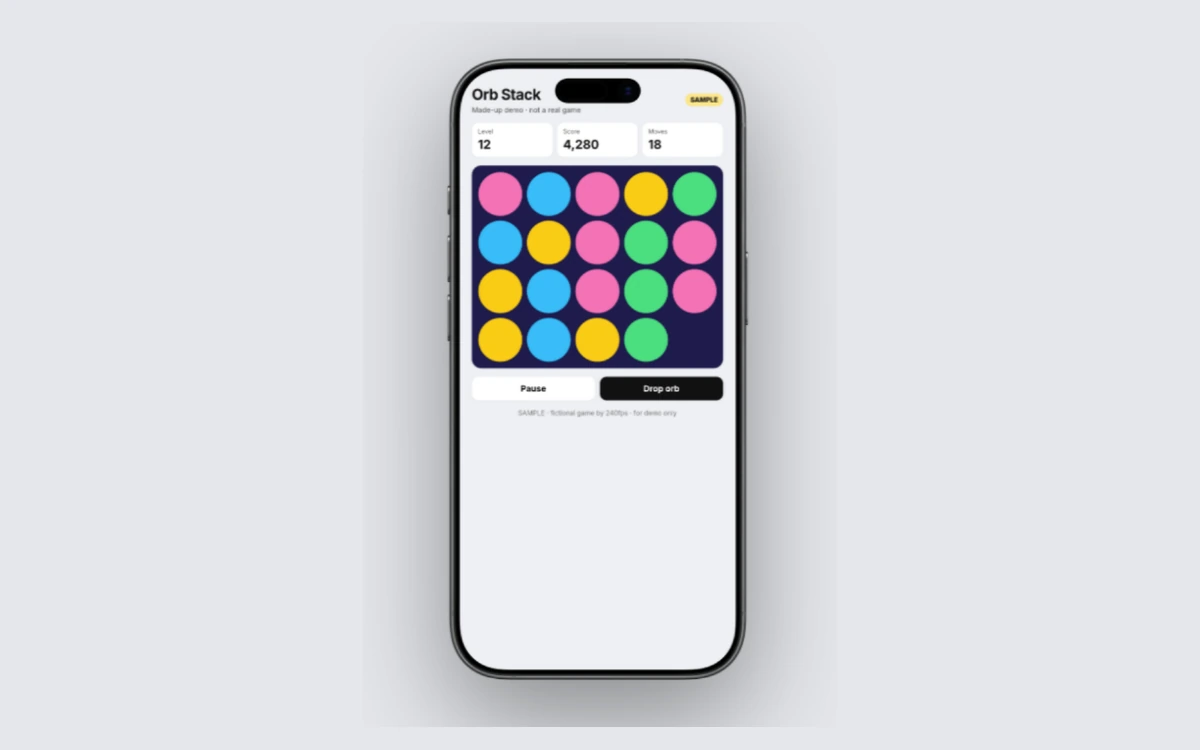
Use your own game's art, and only your own. Another studio's characters, art, title or logo don't belong in your mockup, even as a joke or a placeholder. The example at the top of this page is a made-up puzzle level built by the 240fps team: level 12, a score of 4,280, 18 moves, a grid of coloured orbs and a Drop orb button. It's labelled as a demo on the screen itself.
Check that the score, timer and buttons are still readable once the screen shrinks into a frame. If the numbers that matter disappear at that size, crop to the part of the screen that tells the story. If the game isn't finished, art from your own design files works the same way; what a mockup is explains why.
Make the frame
240fps puts the screen in a device frame in the browser, with nothing to install:
- Open the editor with the phone selected. Start from the iPhone 17 mockup, or use the button on this page. The frame can be portrait or landscape, so a landscape game fits as it's played.
- Add your screen. Paste a screenshot (⌘V), drop an image or video on the canvas, or choose Website and paste a URL. Adding a website needs a free account.
- Style the scene. Pick a finish, a layout and a background, or start from a template.
- Export. Export an image as PNG, JPEG or WebP, or switch to Videos, add motion and export an MP4, WebM or GIF.
If your game is built for tablets first, put it in the iPad Pro 13 mockup instead. Every frame is in the device mockups. Other app types: the fitness app mockup, the finance app mockup and the social app mockup.
The store set
A mockup is for your website, a press kit or a launch post. The stores want their own files, and the store screenshot studio in 240fps makes them, at its own preset export sizes.
App Store. Apple's screenshot specifications ask for at least one screenshot for iPhone with Dynamic Island (medium display), and at least one for the iPad 13-inch display if your app supports iPadOS. You can upload up to 10 per device size, as .jpeg, .jpg or .png, and the images can't include alpha channels or transparency.
Google Play. Google's preview assets help page says you must provide a feature graphic to publish your store listing. It's 1024 by 500 pixels, JPEG or 24-bit PNG with no alpha, and it's a separate file from your phone mockup. You also need at least two screenshots across device types to publish, and a screenshot's longer side can't be more than twice its shorter side. To be eligible for Google Play's recommendation formats that use screenshots, games must provide at least three 16:9 landscape screenshots (minimum 1920 by 1080 pixels) or three 9:16 portrait ones (minimum 1080 by 1920). Those are minimums, not the only sizes allowed.
For the details, see our guides to Google Play screenshots and the Google Play feature graphic.
A moving preview
240fps has an App Preview tool, and the App Store preview video guide covers the store's rules for it.
Price
Designing is free, with every device, template and background, and the Screenshots studio. Free exports are previews up to 1280 px with a small 240fps mark.
Full-size exports are $7 a month (Monthly) or $39 once (Lifetime), with no mark, up to 4K. See 240fps pricing.
FAQs
Can I put my game inside a phone for the store?
Yes, as a mockup for your website or a launch post. For the store listing itself, Apple and Google set their own screenshot rules, so check Apple's screenshot specifications and Google's preview assets page. The 240fps store screenshot studio makes the store set, separately from the phone mockup.
Is the feature graphic the same as the mockup?
No. The Google Play feature graphic is a separate file of 1024 by 500 pixels, and Google says you must provide one to publish your store listing. A game app mockup is your own game screen inside a phone frame, for your website or a launch post. They're different files for different places, so plan to make both.
Is there a game template?
No. There's no game template listed on 240fps today, so you bring your own screen: a level, a result or a character screen from your game, or art from your own design files. You put it in a device frame such as the iPhone 17, then choose the background and layout yourself.
What does a full export cost?
Full-size exports, with no mark and up to 4K, come with 240fps Monthly at $7 a month or Lifetime at $39 once. Designing in the browser is free, and free exports are previews up to 1280 px with a small 240fps mark, so you can try the frame before you pay.